
Additional Information that might be helpful.
Before editing a page all contents and assets should be prepared and checked according to the specifications.
Each module within a page has different specifications concerning the textlength. A text that is too long will not fit into a given module meaning that either a part of the text will not be shown or it will break the design. The reason for textlength limitation is for once the different screen sizes for mobile and desktop devices and better readability for the user. Please refer to the Textlength limitations (Character limit).
All Images have to be formatted to the specific asset specifications for each module. You can find the specifications (image resolution) in this documentation. For most cases it is recommended to use the PNG Fileformat, especially for Images with transparency and Images with text it is mandatory to use PNG. For Images with simple Motives the JPG File Format can be used.
For further information on how to upload images with the correct specifications: download this PDF Guide
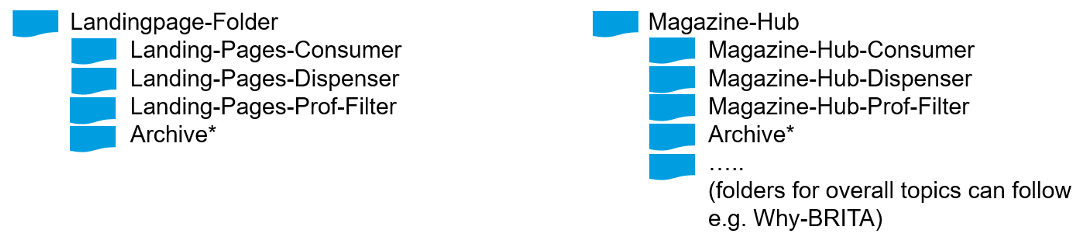
In order to have a better overview within the Magnolia CMS we set-up a guideline and ask you to follow this in terms of folder structure and naming convention for pages, assets and downloads. This way it will be much easier to maintain an overview of all pages and files especially when multiple content editors work on the same pages.
For Landingpage-Folder and Magazine-Hub for Pages App, Assets-App and Downloads-App
The structure within all apps has to be the same to differentiate between the Strategic Business Segments. Folders for overall topics can be added additionally. Old pages or assets can be unpublished and stored in the archive or deleted.
In order to have a better overview – especially in terms of maintenance and archiving – we are asking you to follow this naming convention for pages, assets and downloads.
Please only use ENGLISH namings, lowercase letters (except of country code), minus sign to separate words; Please do not use any special characters in the naming.
SBS-campaign/category/page-content/subject
consumer-spring-offer-marella-2021
consumer-limescale-why-filtering-water
SBS-category/page/module-image-size-content/subject-mobile (if relevant)
consumer-big-teaser-710x400-marella-mobile
dispenser-small-teaser-464x348-waste-prevention
For uploading a new image you should consider the following parts to fill in that are relevant for your visibility on search engines:

brita-SBS-category/product-content/subject-country
brita-consumer-waterfilterbottle-active-instruction-manual-FR
brita-dispenser-vivreau-fill-datasheet-UK
brita-professional-catering-brochure-BE
SBS-category/product-content/subject-country
In the Downloads app, you define the title shown in the frontend, define a preview image and maintain a reference to the respective PDF file uploaded in the Assets app. You can use the same naming convention as for assets (PDFs) but remove “brita”, e.g. dispenser-vivreau-fill-datasheet-FR
dispenser-vivreau-fill-datasheet-FR
When you are finished with editing your Landingpage and ready to publish the page it is highly recommended to do a final check of all "strings attached". This brief checklist is supposed to guide you in all approval relevant apects of Launching your Landingpage.
If you prefer to use the checklist offline you can download the PDF below.
Below you can find further resources and additional links to guide you through the landing page creation process:
| Responsibility | Name | Contact | |
|---|---|---|---|
| Magnolia CMS | |||
|
Access User Accounts |
Platform Team Heike Warrelmann, Daniela Diehl |
||
| General Errors | Platform Team Heike Warrelmann, Daniela Diehl, Jessica Worm-Dunn |
||
| Module Documentation | Corin Ludwig-Simkin | ||
| Training Requests (local budget) | Manuela Kuhn | ||
| Landingpages | |||
| Set-up, editing and publishing | By markets (country editors) | ||
| Support for publishing or general questions/errors | Platform Team
Heike Warrelmann, Daniela Diehl, Franziska Schendel |
||
| Support for landingpage set-up (local budget) including: | |||
| Editing | Manuela Kuhn | ||
| Publishing | Manuela Kuhn | ||
|
Tracking AB Testing SEO |
Christian Lüllig | ||
| Magazine | |||
| General Questions | Content Platform Team
Heike Warrelmann |
||
|
Tracking AB Testing SEO |
Christian Lüllig | ||